


For Rokid and the handheld games you already play, buy the glasses alone first. Add the companion bundle for a separate app activity away from the handheld. For a purchase mainly about charging during play, investigate the power-and-video accessory instead of treating a companion as the answer.
Glasses alone or a companion bundle
| Purchase question | Display purchase | Companion purchase |
|---|---|---|
| The documented arrangement | Rokid Max 2 AR Glasses require a compatible source device. | Rokid AR Spatial includes the Station 2 companion. |
| Starting use | Existing handheld games | A separate companion app activity |
| Workspace | Start with the intended source display path | Rokid AR Spatial supports up to three app windows with Station 2. |
| Carrying and power | Choose the necessary display and power accessories | Account for the additional companion and its accessories |
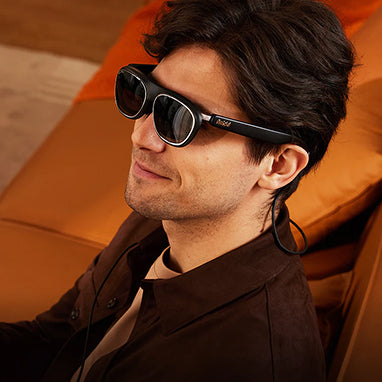
Rokid Max 2 AR Glasses
Rokid Max 2 AR Glasses support refresh rates up to 120 Hz.
3DoF requires Station 2.
Rokid Max 2 AR Glasses generally require DisplayPort output over USB-C for direct connection.
Read the series documentation and the connection information. Start with that documented source path, rather than adding another computer before deciding what it would do.
For your normal games, prioritize menu text, subtitles where relevant, and the seating position in which you play. A story game with small text and a game played in brief sessions can lead to different personal preferences. Decide from the games you already spend time with, rather than an imagined change to the handheld's game performance.
Rokid AR Spatial
See the AR Spatial configuration. Choose that arrangement for a separate activity you want on the companion, such as a supported app workspace. Check the current apps and accounts for that activity before buying for it.
The product page has different selections. Use the actual selected contents when comparing the display purchase with the companion purchase. A differently named Station package is a separate choice; the word Station alone does not establish that two bundles are equivalent.
Plan the power accessories
A question about charging during play is a reason to investigate the intended power-and-video arrangement, not an automatic reason to add a companion. Use the exact accessory description and the handheld's requirements to decide what belongs in the kit. Avoid buying an adapter only because its connector looks suitable.
Keep the planned cable, power equipment and optical arrangement together in the purchase comparison. If you mostly want to travel with less equipment, the simpler display purchase is the starting point. If you also want an activity away from the handheld, the additional companion can have a clear role.
Account for the optical arrangement
Rokid Max 2 AR Glasses support built-in myopia adjustment from 0.00D to -6.00D.
See the optical guidance. Use your own prescription needs to determine whether an additional optical solution belongs in the order. Read the menus and subtitles you normally use, alongside the center of the image.
For the ordinary Steam Deck owner in this guide, begin with the smallest documented display setup that suits the games. Add the companion when its separate activity is something you already want, rather than a speculative improvement to the gaming task.
Tradeoffs
The glasses-only purchase keeps the kit centered on the handheld. Consider the extra item and its recharging routine before adding it to the order. For handheld gaming alone, buy the display purchase first. For the documented spatial behavior or a companion workspace, investigate the bundle instead.
FAQ
Is a companion the right first purchase?
Begin with the activity. For your existing handheld games, start with the documented display path; choose a companion for an additional activity you want away from the handheld.
How should I decide on power accessories?
Check the intended power-and-video accessories together. A companion purchase does not by itself answer that question.
What makes two bundles meaningfully different?
The selected display, companion generation, necessary optical components and included accessories determine the purchase. Compare those contents rather than the broad bundle name.
Check the exact Rokid configuration and required accessories →