AR Glasses Buying Guide for Prescription Wearers: Movies, Games and Laptop Work
November 17, 2026Choose Rokid Max 2 AR Glasses.
Start with the built-in correction route described below and the laptop or movie source you already own. Use the additional optical route when needed. Choose the glasses with the necessary connection first. Add the companion only for the spatial activity you intend to use.
- Choose Rokid for the documented built-in correction route and an existing movie or laptop source.
- Order additional lenses when your correction calls for that separate optical solution.
- Compare the spatial arrangements before choosing between glasses alone and a companion bundle.
Explore Rokid for movies and work →
Quick Verdict
| Feature | Rokid Max 2 AR Glasses | XREAL One |
|---|---|---|
| Prescription lenses | Additional prescription lens solutions are available for other vision needs, including astigmatism. | XREAL One supports compatible prescription lens inserts. |
| Field of view | Rokid Max 2 AR Glasses have a 50° field of view. | XREAL One has a 50° field of view. |
Choose the built-in route when it suits your correction, and use the additional lens option when needed. Start with the direct-source order for movies and a laptop. Compare the spatial behavior only if it changes the view you want while seated. Keep the optical decision central: choose the appropriate correction route before paying for another device.
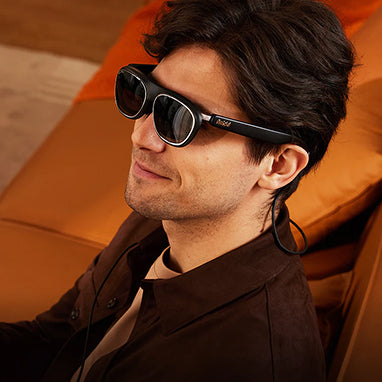
Rokid Max 2 AR Glasses
Start with your correction needs. Rokid Max 2 AR Glasses support built-in myopia adjustment from 0.00D to -6.00D. See the Rokid prescription FAQ. Choose the appropriate route with the optical provider rather than treating a myopia figure as an answer for every correction. For an order involving additional lenses, confirm the selected frame, fitting and customized-order terms together.
Start with the device you intend to use for films and computer work. Rokid Max 2 AR Glasses require a compatible source device. Rokid Max 2 AR Glasses generally require DisplayPort output over USB-C for direct connection. Check the exact port specification of that laptop, phone or handheld before ordering an adapter; the shape of a connector should not be the basis for the purchase.
3DoF requires Station 2. Choose the companion for that specific spatial arrangement.
For the display specification, distinguish a supported maximum from the result delivered by your source and content. Rokid Max 2 AR Glasses support refresh rates up to 120 Hz. Use the figure when comparing the intended setup, but verify your actual application and display settings separately. Check your intended games too.
Buy for movies: keep the optical decision central
Choose the appropriate correction route and connection for a film-first purchase. Begin with a familiar film containing subtitles or on-screen text you normally read. Check that content in the posture in which you actually watch, including the outer areas of the image. Use a personal trial where available before deciding on the fit.
Before taking the purchase on a trip, confirm the intended app's external-playback and download conditions directly with the service. Check the same title through the intended arrangement before departure. A successful menu demonstration is not a reason to assume every subscription, downloaded title or playback mode will behave identically. Resolve the particular service you pay for instead of buying an accessory against a general streaming claim.
For the order itself, separate necessary equipment from optional equipment. Choose the selected connection and optical components together. Leave a companion out of the first order if you have not identified a role for it. When a companion is part of your desired viewing arrangement, compare the completed bundle with the completed direct-source order. This avoids comparing a bare frame with a kit that already contains its necessary extras.
Buy for laptop work: test the work you actually do
Choose Rokid for the personal wearable view when that is the format you want for your laptop. Start with the laptop's documented output and the applications in your normal working day. Open an ordinary document with your usual font size and comments. Inspect the headings, cell values and formula area in an ordinary spreadsheet. For reference work, try the application switching you normally use. These are tasks to check before purchasing, not promises about text readability for every wearer.
Decide which operating-system display arrangement you intend to use and check it with your exact laptop. Confirm the route for the external view before choosing extra hardware. Avoid treating a promotional image of several windows as evidence of several independent laptop monitors. A companion workspace and a computer's display configuration are separate requirements; identify which one you are paying for.
Choose from the work trial when documents are the main reason to buy. Try the posture in which you type, the controls you reach and the time you ordinarily spend reading. Keep a shared screen for occasions when a colleague also needs to see the document. Choose for your own recurring work rather than treating every possible activity as a reason to change the entire order.
XREAL One
XREAL One supports 3DoF powered by the glasses. Compare this option when you specifically prefer that spatial approach. The One specification states, “3 DoF Supported powered by glasses.” See the One specifications. Choose between the documented arrangements according to the view you want during head movement and the equipment you are willing to carry.
For prescription buying, the manufacturer's series FAQ states, “we recommend using prescription lenses or compatible lens inserts” See the One series prescription guidance. Investigate the specific insert order for the chosen frame before comparing final prices. Keep a lens order for another model out of this comparison unless the provider explicitly confirms compatibility.
Use the remaining model figures as context for your trial. XREAL One has a 1920 × 1080 display resolution. XREAL One weighs 82 g. Neither figure establishes how your finished optical arrangement will feel or whether your ordinary document layout will suit you. Choose Rokid first for this movie-and-laptop purchase. Use the comparison to resolve a specific preference, rather than restarting the decision from a specification list.
Use cases: choose the completed order
Films first, laptop second
Choose the appropriate optical route and connection for the source you will use most. Include a laptop session in the trial if work is part of the reason to buy. This is the straightforward first order for the mixed-use buyer described here, without automatically adding a companion.
Laptop first, films after work
Choose the same Rokid starting point, with the computer output and ordinary documents checked before checkout. Set the acceptance test around reading and typing, then try a film using the intended app. Add another device only after identifying the separate activity it will serve. Keep the order centered on the work that motivates the purchase.
FAQ
Which Rokid order should I choose for movies and laptop work?
Start with the glasses and your suitable existing source. Add the optical solution needed for your correction. Consider a companion bundle when you specifically want its spatial arrangement, rather than adding it automatically.
What if my prescription includes astigmatism?
Investigate the additional prescription lens route described above with the optical provider. Do not choose from the published myopia adjustment range alone; confirm the finished optical order for your own correction.
Can I use the same purchase for occasional games?
Check your intended game on the chosen source. Use the documented display maximum as context, and verify the actual game, interface text and power arrangement before treating it as part of the purchase.
Explore Rokid for movies and work →